I picked up a nandland Go Board to start learning about FPGAs. Just for fun, nothing too serious. I got the “Getting Started with FPGAs” book along with the development board, for just over $100. Good deal.
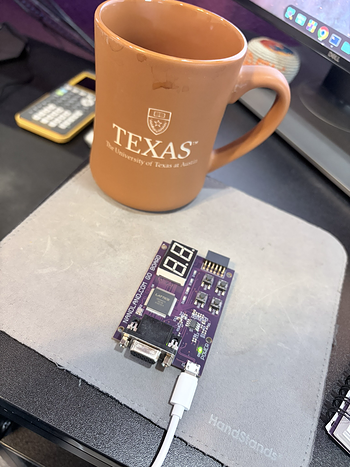
The only snag is that book suggests using the iCEcube2 toolchain directly from Lattice Semiconductor. Although that official toolchain is free if you request a license for personal use, the Linux support is terrible. They only provide a 32-bit binary from 2020 and making it work on a modern Linux system is a nightmare.
Good news though, because there is a 100% open source toolchain that works perfectly for these iCE40 FPGAs. Hooray! Minor caveat - the toolchain out of the box only works with Verilog.
In fact, everything you need is available in packages for Ubuntu 24.04 or Fedora 23 (and hopefully all future versions).
Install Ubuntu Packages
sudo apt install yosys nextpnr-ice40 fpga-icestorm
Install Fedora Packages
sudo dnf install yosys icestorm nextpnr
With that, we can already go through the design, synthesis, place+route, and program stages to get our Verlog onto the FPGA.
Say we have our Verilog file example.v and our physical constraints file
example.pcf.
➜ ls
example.pcf  example.v
step 1: synthesis using yosys
This command reads the Verilog file and synthesizes it into a JSON netlist file
called hardware.json that the place+route tool can understand. Obviously,
replace YourModule with your top-level module name in the Verilog file.
yosys -p "synth_ice40 -top YourModule -json hardware.json" example.v
step 2: place and route using nextpnr
Next we produce a hardware.asc file that based on the physical layout of our
chip and the hardware.json file we just created, along with the physical
constraints file example.pcf we defined. Note that we add the --freq 25
parameter to specify the frequency instead of using a .sdc file for specifying
the clock constraint.
nextpnr-ice40 --hx1k --package vq100 --json hardware.json --pcf example.pcf --asc hardware.asc --freq 25
step 3: pack the bitstream using icepack
That .asc file is a text representation of our hardware, but our FPGA needs
a binary bitstream. For this we will produce hardware.bin using icepack.
icepack hardware.asc hardware.bin
step 4: program the board using iceprog
Finally we can upload the .bin file to our NanLand Go development board.
iceprog hardware.bin
And that’s it!
Your Verilog and constraints should be uploaded to the FPGA hardware now.